
Export your Asana Timeline to a clean Gantt chart PDF
Asana has no PDF export for the Timeline or Gantt view, so plans end up as cropped screenshots. TaskExport turns any Asana project into a print-ready, landscape Gantt chart you can send to clients and executives in seconds.
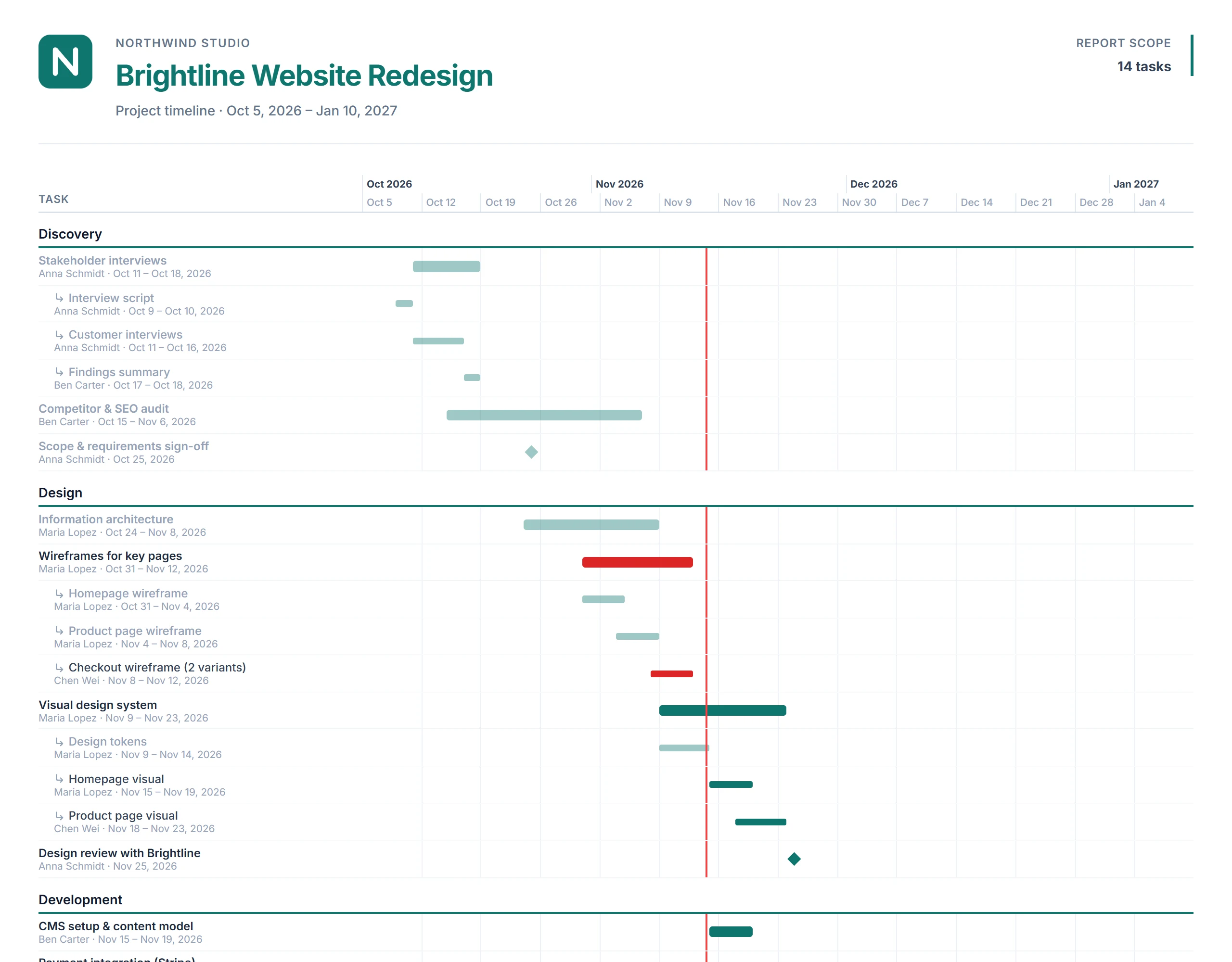
Everything a stakeholder needs on one page
- Bars from your Asana datesStart and due dates become bars; milestones become diamonds.
- Sections and subtasksPhases keep their Asana order; dated subtasks appear under their parent task.
- Overdue work in redPlus a "today" line, so progress is obvious at a glance.
- Readable on paperLandscape A4, A3 or Letter, with the date scale repeated on every page.
- Days, weeks or monthsPicked automatically from the project length, or set it yourself.
- Your brandingLogo, brand color and company name. Paid plans are fully white-label.
How to export an Asana Gantt chart to PDF
- Connect Asana. Sign in with your Asana account (read-only access).
- Pick a project and choose "Timeline (Gantt chart)". Optionally limit the date range, assignee or status.
- Download the PDF. Preview it first, then download a print-ready file.
Frequently asked questions
Can I export an Asana timeline or Gantt chart to PDF?
Asana itself does not offer a PDF export for the Timeline or Gantt view; the usual workarounds are screenshots or browser printing, which cut the chart off. TaskExport reads your project through the official Asana API and builds a print-ready Gantt chart PDF from your tasks' start and due dates.
Which tasks appear on the timeline?
Every task that has a start date or a due date. Tasks with both dates become bars, tasks with only a due date become one-day bars, and Asana milestones are shown as diamonds. Turn on "Include Subtasks" to show dated subtasks as thinner bars under their parent task. Tasks without any dates are listed separately under "Not scheduled", so nothing silently disappears.
What paper sizes and scales are supported?
Landscape A4, A3 and US Letter. The scale is chosen automatically (days for short projects, weeks for a few months, months for long ones), or you can pick days, weeks or months yourself. The date scale is repeated at the top of every page.
Can I share it with clients who do not use Asana?
Yes. The PDF is a regular file you can email or attach to a proposal. You can add your logo, brand color and company name, and on paid plans the PDF carries no TaskExport branding.